
What Is Incident Command Software?
Incident command software is the tool a public safety agency uses to coordinate a response in real time: tracking resources, assignments, objectives, locations, intel, and decisions in one shared workspace as an incident unfolds. Incident Command is meant for long standoffs and preplanned events. Done well, it gives the person running the call the structure to control the scene and lets them spend their attention on command decisions instead of administrative coordination.
What does incident command software organize?
Think of a barricade with a hostage that runs long. The IC is working it off a whiteboard in the command post, and the phone will not stop ringing: the chief, a neighboring agency, a family member with a number for the subject. Every update comes in third-hand and gets relayed back out the same way. Somewhere in that relay a caller mentions a second subject inside and a back door off the kitchen, and it gets written on the board late, after the react team has already set on the front. The IC was not slow. The IC was transcribing instead of thinking, and at that scale a person cannot do both.
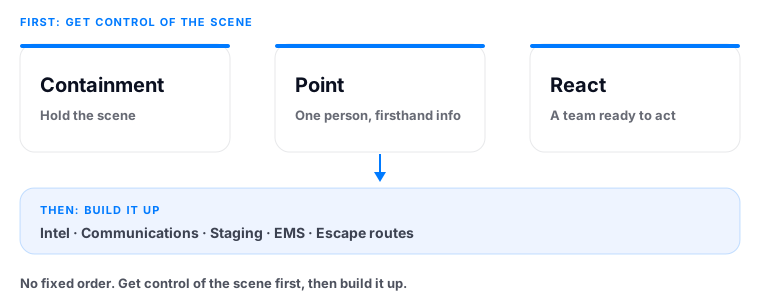
A call goes from routine to a growing incident, and a patrol supervisor is suddenly responsible for dozens of moving details while making decisions that carry real weight, all at once. The first job is getting control of the scene: containment, a point person with firsthand information, a react team ready to act. Then you build it up: intel, communications, staging, EMS, escape routes. That discipline, organizing a response into clear roles, objectives, and resource assignments, is codified in the Incident Command System, the standardized management structure defined by FEMA’s National Incident Management System (NIMS). Incident command software is where those details live so they don’t scatter:
- Resources, what’s on scene, what’s en route, what’s assigned.
- Assignments, who has what objective and where.
- Geography, perimeter, containment positions, staging.
- Intel, what’s known, from whom, and when.
- Status, the live flags that everyone needs to see at a glance: EMS staged, shelter in place, evacuation underway.
Every detail that lives in the software is a detail the commander doesn’t have to carry in their head or chase down by radio.
What is incident command software NOT?
Two common confusions are worth clearing up before evaluating any system:
- It is not a whiteboard. A whiteboard is a snapshot in one room. Incident command software is live and shared, the moment it changes, everyone sees it, regardless of where they are.
- It is not your system of record. Your evidence management and records systems own the official archive. Good incident command software is the live operational layer during the call. Not the long-term store. See why that distinction matters for adoption and compliance.
What should I look for in incident command software?
Not all “incident command” tools do the same job. The ones that hold up under a real callout share a few traits:
Live sync across every role
Patrol, command, tactical teams, investigations, and leadership all work from one current view: what FEMA’s NIMS guidance describes as a common operating picture that keeps every responder aligned. No “latest version” problem, no waiting for a briefing to propagate. The moment anyone updates it, everyone sees it.
It follows the whole incident lifecycle
The strongest systems carry context from first patrol unit through command, tactical operations, investigations, and resolution, so it is inherited at each handoff, not rebuilt. A specialized team arriving later sees what patrol already established. This is the difference in the patrol to SWAT handoff: inheriting the incident picture versus rebuilding it under pressure.
It pairs with live video
An incident isn’t just a plan or just a feed, it’s both. The most useful systems put the live video and the operational workspace in the same place, so what you see and what you’re doing about it are always on the same screen. Drone feeds, helicopter video, fixed cameras, and witness video belong on the same wall as the assignments.
It supports planned operations too
Beyond reactive calls, the same workspace should support preplanned events, warrant service, planned investigative operations, where the plan, assignments, threat assessment, and medical plan are built ahead of time and run live on the day.
How does incident command software support situational awareness?
Incident command software is one half of the equation. Situational awareness is the commander’s read on the scene, knowing what’s happening, what it means, and what comes next. The software is the tool that makes it achievable: it takes the organizing burden off the commander so their attention goes to the part only they can do. A shared view also means the IC isn’t the one relaying every update by radio.
BabbarOps’ Incident Command is built on exactly these principles: a live synced workspace that follows the incident from patrol response through resolution, paired on the same platform with the live video wall, and supporting both reactive and preplanned events. It organizes the details of the response so the burden lifts off the one person who can least afford to carry it.
That is the whole point. The IC who is transcribing the scene is not commanding it, and on a long call the difference shows up in the decisions that get made late. Give the IC the structure, and you give them back the only thing the job actually needs from them: the room to think.
Incident command software is the tool a public safety agency uses to coordinate a response in real time: tracking resources, assignments, objectives, locations, intel, and decisions in one shared workspace as an incident unfolds. Done well, it lets a supervisor spend their attention on command decisions instead of administrative coordination.
A whiteboard is a snapshot in one room; only the people physically present see it, and it goes stale the moment something changes. Incident command software is live and shared across every role: the moment anyone updates it, everyone working the incident sees the change, regardless of where they are.
No. Incident command software is the live operational layer during the call. A system of record is the long-term archive of evidence and documentation. Your evidence management and RMS platforms own the record. Incident command software owns the live picture and stays out of the archive entirely.
Yes. The same workspace that handles reactive calls supports planned in advance operations (warrant service, planned investigative operations) where the plan, assignments, threat assessment, and medical plan are built ahead of time and run live on the day of the operation.
The most useful systems share four traits: live sync across every role so no one works from a stale picture; a lifecycle that follows the incident from first patrol unit through resolution so context is inherited at each handoff; live video paired with the workspace so the feed and the plan are on the same screen; and support for both reactive and planned in advance operations.
When a live synced workspace is in use, a SWAT team activating mid incident inherits what patrol already established (containment positions, assignments, intel, and the operational picture) instead of rebuilding it from a verbal briefing. That turns a costly re-gathering exercise into a head start.
Sources: FEMA, National Incident Management System (NIMS); FEMA, NIMS Components and Guidance; FEMA, National Incident Management System, 3rd ed. (2017).
BabbarOps’ Incident Command gives the IC the tools to control the scene and gives everyone else a shared picture, including the roles that join to support the resolution, like SWAT and investigations. One live synced picture from first response through resolution, paired with the live video wall. See it working with your assets.

Sukh Bhela is a California police sergeant who has served as a UAS operator, UAS supervisor, and incident commander during critical incidents. His experience leading patrol operations and integrating drone technology into public safety responses led him to found BabbarOps, where he builds tools for live situational awareness and incident command. He writes about policing, drone operations, leadership, and the technology shaping the future of emergency response.
The views expressed here are the author's own, written in his personal capacity. They do not represent, and are not made on behalf of, any law enforcement agency or employer.
BabbarOps is an independent commercial product and is not affiliated with or endorsed by any law enforcement agency.